Noel

Independent game designer and programmer. Created Subterfuge, Casey's Contraptions, Flower Garden. Runner. Cyclist. Nature enthusiast. Magic addict. @noel_llopis.

Casey’s Contraptions Weekly Update (Oct 29)

Casey-Portrait-2.pngI like to be as open as possible about any project I’m working on, whether it’s giving talks, sharing technology, or discussing sales numbers. That goes for projects in progress too, although sometimes it makes sense to wait a while before announcing them. In the case of Casey’s Contraptions, we had an early announcement because of the IGF entry, so we might as well start talking about the game.

At one point I was half-seriously toying with the idea of creating a Twitter account that would show our latest commits to Subversion. Apart from the 140 character limit, that falls in the TMI category.

So instead, I thought it might be interesting to give a weekly update with what Miguel and I have been up to each week. Hopefully it will give you a glimpse at what’s going on behind the scenes. Any feedback in what you want to see more or less of is totally welcome.

Week Of Oct 29

sidebar2.pngBoth Miguel and I felt this was a very slow week. I’m not sure exactly why, but I suspect post-IGF submission syndrome. We’re feeling the mini-crunch we did leading up to it, and now we have lots of not-so-fun tasks to do on our planes. Still, I think we’ve been slowly picking up speed. Next week should be a fully productive one.

Sound Effects

We added audio for in-game sound effects. Up until now we only had background music and no sound effects at all. Yes, that means we submitted to the IGF without sounds. Yikes! We had to cut corners somewhere. Fortunately, since the IGF takes updates, the next update will include some initial sound effects.

We’re using OpenAL for audio playback, and I was pleasantly surprised to see how simple and efficient it is. What a great change from using AVAudioPlayer!

We’re currently trying to define the style of the sound effects. It’s a strange mix of slightly cartoony, but not too much. Hopefully we’ll zero in on that next week.

Sharing Of Levels

Sharing of levels. We can finally share levels through email. It makes sending levels to each other much easier, and it should come in handy for the next round of testing. Of course, we still can’t reference an attached file from an email using the Apple API, so we’re having to submit levels and a screenshot to the server and store it there.

Sandbox editor

There’s more to creating a level than just placing objects. To create a playable level we need a title, a specific background, some goals, and a set of available items in the toolbox. Since we want people to share fully-featured levels, we’re building this UI right into the game, and it’s what we’re going to use to create all the levels ourselves. We can’t wait to see what people create, but, I have to admit, it’s somewhat of a pain to implement :-). We still have a few days of work in this one.

Right now it’s all using UIKit on top of OpenGL. I’m still waiting for a great, cross-platform GUI library + tools that gives us the basic features from UIKit + Interface Builder but it’s fully cross-platform.

Also, while Miguel isn’t looking, I’ll share with you what we have so far for the level editor sidebar.

In case you missed it, Casey has a Twitter account. And apparently he likes Angry Birds quite a bit! ๐Ÿ™‚

Also, don’t forget to join the Casey’s Contraptions Facebook page.

360iDev: The Conference You Can’t Miss

360idev.pngIt’s no secret that I like a good conference. Actually, I’m sure I can find something to enjoy even at a so-so conference. Each field has it’s big, ultimate conference: For games it’s GDC, for graphics SIGGRAPH, and for iPhone development WWDC. Those big conferences have the big announcements, the big crowds, and the big players. But the smaller conferences always have something a unique to them that the big ones can’t compete against.

I’m going to say this very clearly so it doesn’t get lost in the middle of a paragraph.

360iDev is the best conference you can go to if you’re doing any kind of iOS development.

There. I’ve said it. And no, they’re not paying me any to say that.

I’m clearly not the only one who feels that way either. Just earlier this week Mike Berg wrote a post about how awesome 360iDev is, and we didn’t even compare notes. Great minds think alike apparently.

Yes, Apple puts the big show for WWDC. It’s a unique experience: the keynote, the crowds, the unveiling of the latest technologies, the sessions, the labs… But in the end, it’s a big show from Apple to woo its developers. You’re getting the official message through very polished presentations. Which is fine, but it feels a bit… too polished. Too streamlined. Too overproduced.

Talk to developers who’ve been to WWDC multiple times, and you’ll quickly find out that the parts they like best are the labs (access to Apple engineers) and the networking (some with Apple, but mostly with other attendees). That’s why keeping track of the parties during WWDC is almost a full-time job!

For Developers, By Developers

360iDev on the other hand is a conference for developers by developers. You don’t get fed the official party line. Instead, you get to hear how some API really worked (or didn’t) in the trenches, how developers had to work around bugs, or, why not, how some technology was a dream to work with. Nothing like hearing it straight from the horse’s mouth.

Strong Game Development Track

There are usually three simultaneous tracks at 360iDev: Business, Sights and Sounds, and Development Tricks. As you can expect, sights and Sounds is usually entirely devoted to games, and there’s plenty of game-related info in the other tracks as well.

I’m going to be totally honest here: The quality of the sessions varies a lot from one to the other, and they can be somewhat hit or miss. When the presentations are awesome, they’re really awesome. And on the average, I’d say they’re very good. That’s the flip side of not having a super-rehearsed, super-polished presentations like WWDC.

Hacker Vibe

You walk into WWDC, and you get a very strong corporate feeling (trying to be developer friendly). The moment you walk into 360iDev, it has a palpable hacker vibe [1]. The people presenting might not have the most polished slides, but they can do some amazing things on the iPhone. There are even presentations on the internals of the iPhone and what’s going on under the hood, something you’ll never get from Apple!

Game Jam

As a perfect example of the hacker mentality, the Game Jam has become a regular feature at 360iDev. On the last night, developers get together in a big rooms, and either flying solo or grouping into teams, they create a game prototype in a few hours. The next day at lunch, we have a big gathering and get to demo the games created the previous night to everybody. What a perfect (and exhausting!) last day to the conference!

It’s Nimble And Agile

This might not seem like a big deal to some, but it’s very important: 360iDev happens twice a year. Technology conferences that happened once a year might have been fine 10-15 years ago, but as the pace of technological advance continues to accelerate, once a year doesn’t cut it anymore. Especially if you have to submit talk proposals 6-8 months in advance, they’re old news by the time the conference rolls around.

360iDev is much more agile than that. It happens twice a year, and you only need to submit a general overview a few months in advance. Given the content of a lot of the talks, they probably come together just weeks (if not days) before the conference itself. That’s part of the reason for the uneven quality of the talks, but it’s a price worth paying.

Networking

360iDev is a small conference. I don’t know the official numbers, but I think there are usually around 200-300 attendees. You’ll be seeing the same faces all three days, especially the ones that share your same interests and end up going to the same sessions as you do. Even if you’re a total introvert, you’ll end up meeting a bunch of new, very interesting people, and creating lots of new possibilities for your future.

Even better, the speakers are part of that small number of attendees, and they get to hang out with everybody else. There aren’t special VIP parties, or secret off-site invitation-only parties (if they are, they’re so secret I missed them). Everybody hangs out during the sessions, at lunch, and the evening festivities. So if there’s someone in the speaker list you particularly want to meet, this is your chance.

It’s not just other developers either. The iPhone media often comes to the conference as well, so you might get a chance to talk to people from TouchArcade or TUAW.

360iDev three full days of sessions, one day of tutorials, one night of game jam, three evenings or parties, and one conference full of awesome. And that for a fraction of price of the big conferences. How can you go wrong? [2]

[1] I mean hacker in the good sense of the word, not in the “cracker”, malicious one!

[2] If this doesn’t convince Gavin and Craig to come to 360iDev, I don’t know what will. Go buy the awesome Linkoidz so they’ll be forced to attend ๐Ÿ™‚

linkoidz-blog-banner.jpg

This post is part of iDevBlogADay, a group of indie iPhone development blogs featuring two posts per day. You can keep up with iDevBlogADay through the web site, RSS feed, or Twitter.

Start Pre-allocating And Stop Worrying

One of the more frequent questions I receive is what kind of memory allocation strategy I use in my games. The quick answer is none (at least frame to frame, I do some allocation at the beginning of each level on a stack-based allocator). This reprint of one of my Inner Product column covers quite well how I feel about memory allocation.

We’ve all had things nagging us in the back of our minds. They’re nothing we have to worry about this very instant, just something we need to do sometime in the future. Maybe that’s changing those worn tires in the car, or making an appointment with the dentist about that tooth that has been bugging you on and off.

Dynamic memory allocation is something that falls in that category for most programmers. We all know we can’t just go on allocating memory willy-nilly whenever we need it, yet we put off dealing with it until the end of the project. By that time, deadlines are piling on the pressure and it’s usually too late to make significant changes. With a little bit of forethought and pre-planning, we can avoid those problems and be confident our game is not going to run out of memory in the most inopportune moment.

On-Demand Dynamic Memory Allocation

memory-all-ranks.jpgThe easiest way to get started with memory management is to allocate memory dynamically whenever you need it. This is the approach many software engineering books consider as ideal and it’s often encouraged in Computer Science classes.

It’s certainly an easy approach to use. Need a new animation instance when the player is landing on a ledge? Allocate it. Need a new sound when we reach the goal? Just allocate another one!

On-demand dynamic memory allocation can help to keep memory usage to a minimum, because, you only allocate the memory that you need and no more. In practice it’s not quite as neat and tidy because there can be a surprisingly large amount of overhead per allocation, which adds up if programmers become really allocation-happy.

It’s also a good way to shoot yourself in the foot.

Games don’t live inside a Computer Science textbook, so we have to deal with real world limitations, which make this approach cumbersome, clunky, and potentially disastrous. What can go wrong with on-demand dynamic memory allocation? Almost everything!

Limited Memory

Games, or any software for that matter, run on machines with limited amounts of memory. As long as you know what that limit is, and you keep extremely careful track of your memory usage, you can remain under the limit. However, since the game is allocating memory any time it needs it, there will most likely come a time when the game tries to allocate a new block but there is no memory left. What can you do then? Nothing easy I’m afraid. You can try to free an older memory block and allocate the new one there, or you can try to make your game tolerant to running out of memory. Both those solutions are very complex and difficult to implement correctly.

Even setting memory budgets and sticking to them can be very difficult. How can a designer know that a given particle system isn’t going to run out of memory? Are these AI units going to create too many pathfinding objects and crash the game? Hard to say until we run the game in all possible combinations. And even then, how do you know it isn’t going to crash five minutes later? Or ten? It’s almost impossible to know for certain.

If you insist in using this approach, at the very least, you should tag all memory allocations, so you have an idea of how memory is being used. You can either tag each allocation based on what system initiated it (physics, textures, animation, sound, AI, etc) or even on the filename where it originated, which has the advantage that it can be automated and should still give you a good picture of the overall memory usage.

Memory Fragmentation

Even if you take lots of pain not to go over your the available memory, you might still run into trouble because of memory fragmentation. You might have enough memory for a new allocation, but in the form of many small memory blocks instead of a large contiguous one. Unless you provide your own memory allocation mechanism, fragmentation is something that is very hard to track on your own, so you can’t even be ready for it until the allocation fails.

Virtual Memory

Virtual memory could solve all those problems. In theory, if you run out of real memory, the operating system swaps out some older, unused pages to disk and makes room for the new memory you requested. In practice, it’s just a bad caching scheme because it can be triggered at the worst possible moment, and it doesn’t know about what data it’s swapping out or how your game uses it.

Games, unlike most other software, have a “soft realtime” requirement: The game needs to keep updating at an acceptable interactive rate, which is somewhere around 15 or more frames per second. That means that gamers are going to make a trip to the store to return your game if it pauses for a couple of seconds every few minutes to “make some room” for new memory. So relying on virtual memory isn’t a particularly attractive solution.

Additionally, lots of games run in platforms with fixed amounts of RAM and no virtual memory. So when memory runs out, things won’t get slow and chuggy, they’ll crash hard. When the memory is gone, it’s really gone.

Performance Problems

There are some performance issues that are relatively easy to track down and fix. Usually ones that occur every frame and are happening in a single spot: some expensive operation, a O(n3) algorithm, etc. Then there are performance problems introduced by dynamic memory allocations, which can be really hard to track down.

Standard malloc returns memory pretty quickly, and usually doesn’t ever register on the the profiler. Every so often though, whenever the game has been running for a while and memory is pretty fragmented, it can spike up and cause a significant delay for just a frame. Trying to track down those spikes has caused more than one programmer to age prematurely. You can avoid some of those problems by using your own memory manager, but don’t attempt to write a generic one yourself from scratch. Instead start with some of the ones listed in the references.

Malloc spikes are not the only source of performance problems. Allocating many small blocks of memory can lead to bad cache coherence when the game code access them sequentially. This problem usually manifests itself as a general slowdown that can’t be narrowed down in the profiler. With today’s hardware of slow memory systems and deep caches, good memory access patterns are more important than ever.

Keeping Track Of Memory

Another source of problems with dynamic memory allocation are bugs in the logic that keeps track of the allocated memory blocks. If we forget to free some of them, our program will have memory leaks and has the potential to run out of memory.

The flip side of memory leaks are invalid memory access. If we free a memory block and later we access it as if it were allocated, we’ll either get a memory access exception, or we’ll manage to corrupt our own game.

Some techniques, such as reference counting and garbage collection can help keep track of memory allocations, but introduce their own complexities and overhead.

Introducing Pre-allocation

On the opposite corner of the boxing ring is the purely pre-allocated game. It excels at everything that the dynamically-allocated game is weak at, but it has a few weaknesses of its own. All in all, it’s probably a much safer approach for most games though.

The idea behind a pre-allocation memory strategy is to allocate everything once and never have to do any dynamic allocations in the middle of the game. Usually you grab as big a block of memory as you can, and then you carve it out to suit your game’s needs.

Some advantages are very clear: no performance penalties, knowing exactly how your memory is used, never running out of memory, and no memory fragmentation to worry about. There are some other more subtle advantages, such as being able to put data in contiguous areas of memory to get best cache coherency, or having blazingly-fast load times by loading a baked image of a level directly into memory.

The main drawback of pre-allocation is that is more complex to implement than the dynamic allocation approach and it takes some planning ahead.

Know Your Data

For preallocation to work, you need to know ahead of time how much of every type of data you will need in the game. That can be a daunting proposition, especially to those used to a more dynamic approach. However, with a good data baking system (see last month’s Inner Product column), you can get a global view of each level and figure out how big things need to be.

There is one important design philosophy that needs to be adopted for preallocation to work: Everything in the game has to be bounded. That shouldn’t feel too restrictive; after all, the memory in your target platform is bounded, as well as every single resource. That means that everything that can create new objects, including high-level game constructs, should operate on a fixed number of them. This might seem like an implementation detail, but it often bubbles up to what’s exposed to game designers. A common example is an enemy spawner. Instead of designing a spawner with an emission rate, it should have a fixed number of enemies it can spawn (and potentially reuse them after they’re dead).

Potentially Wasted Space

If you allocate enough data for the worst case in your game, that can lead to a lot of unused data most of the time. That’s only an issue if that unused data is preventing you from adding more content to the game. We might initially balk at the idea of having 2000 preallocated enemies when we’re only going to see 10 of them at once. But when you realize that each of those enemies is only taking 256 bytes and the total overhead is 500 KB, which can be easily accommodated in most modern platforms today.

Preallocation doesn’t have to be as draconian as it sounds though. You could relax this approach and commit to having each level preallocated and never having dynamic memory allocations while the game is running. That still allows you to dynamically allocate the memory needed for each level and keep wasted space to a minimum. Or you can take it even further and preallocate the contents of memory blocks that are streamed in memory. That way each block can be divided in the best way for that content and wasted space is kept to a minimum.

Reuse, RecycleM

If you don’t want to preallocate every single object you’ll ever use, then you can create a smaller set, and reuse them as needed. This can be a bit tricky though. First of all, it needs to be very much specific to the type of object that is reused. So particles are easy to reuse (just drop the oldest one, or the ones not in view), but might be harder with enemy units or active projectiles. It’s going to take some game knowledge of those objects to decide which ones to reuse and how to do it.

It also means that systems need to be prepared to either fail an allocation (if your current set of objects is full and you don’t want to reuse an existing one), or they need to cope with an object disappearing from one frame to another. That’s a relatively easy problem to solve by using handles or other weak references instead of direct pointers.

Then there’s the issue that reusing an object isn’t as simple as constructing a new one. You really need to make sure that when you reuse it, there’s nothing left from the object it replaced. This is easy when your objects are just plain data in a table, but can be more complicated when they’re complex C++ classes tied together with pointers. In any case, you can’t apply the Resource Acquisition Is Initialization (RAII) pattern, but it doesn’t seem to be a pattern very well suited for games, and it’s a small price to pay for the simplicity that preallocation provides.

Specialized Heaps

Truth be told, a pure pre-allocated approach can be hard to pull off, especially with highly dynamic environments or games with user-created content. Specialized heaps is a combination of dynamic memory allocation and pre-allocation that takes the best of both worlds.

The idea behind specialized heaps is that the heaps themselves are pre-allocated, but they allow some form of specialized dynamic allocation within them. That way you avoid the problems of running out of memory, or memory fragmentation globally, but you still can perform some sort of dynamic allocation when needed.

One type of specialized heaps is based on the object type. If you can guarantee that all objects allocated in that heap are going to be of the same size, or at least a multiple of a certain size, memory management becomes much easier and less error prone, and removes a lot of the complexity of a general memory manager.

My favorite approach for games is to create specialized heaps based on the lifetime of the objects allocated in them. These heaps use sequential allocators, always allocating memory from the beginning of a memory block. When the lifetime of the objects is up, the heap is reset and allocations can start from the beginning again. The use of a simple sequential allocator bypasses all the insidious problems of general memory management: fragmentation, compaction, leaks, etc. See the code in http://gdmag.com/resources/code.htm for an implementation of a SequentialAllocator class.

The heap types most often used in games are:

  • Level heap. Here you allocate all the assets and data for the level at load time. When the level is unloaded, all objects are destroyed at once. If your game makes heavy use of streaming, this can be a streaming block instead of a full level.
  • Frame heap. Any temporary objects that only need to last a frame or less get allocated here, and destroyed at the end of the frame.
  • Stack heap. This one is a bit different from the others. Like the other heaps, it uses a sequential allocator and objects are allocated from the beginning, but instead of destroying all objects at once, it only destroys objects up to the marker that is popped fro the stack.

What About Tools?

You can take everything I’ve written here, and (almost) completely ignore it for tools. I fall in the camp of the programmers who consider the runtime as a totally separate beast from the tools. That means that the runtime can be lean and mean and minimalistic, but I can relax and use whatever technique makes me more productive when writing tools. That means you can allocate memory any time you want, you can use complex libraries like STL and Boost, etc. Most tools are going to run on a beefy PC and a few extra allocations here and there won’t make any difference.

Be careful with performance-sensitive tools though. Tools that build assets or compute complex lighting calculations might be a bottleneck in the build process. In that case, performance becomes crucial again and you might want to be a bit more careful about memory layout and cache coherency.

On the other hand, if the tool you’re writing is not performance sensitive, you should ask yourself if it really needs to be written in C++. Maybe C# or Python are better languages if all you’re doing is transforming XML files or verifying that a file format is correct. Trading performance for ease of development is almost always a win with development tools.

Next time you reach out for a malloc inside your main loop, think about how it can fail. Maybe you can pre-allocate that memory and stop worrying about what’s going to happen the day you prepare the release candidate.

This article was originally printed in the February 2009 issue of Game Developer.

Casey’s Contraptions And The IGF

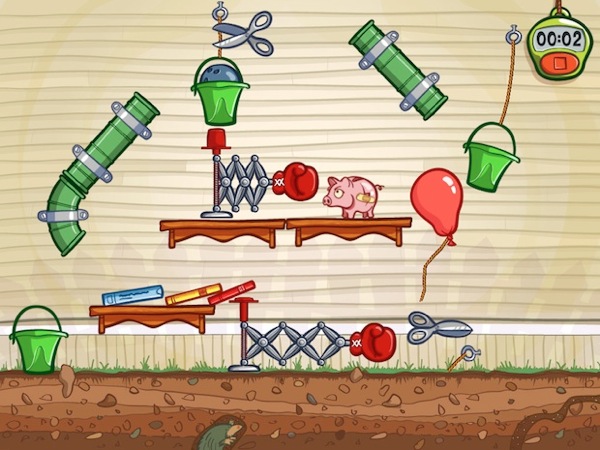
casey.pngToday is the day! We finally announced my next game: Casey’s Contraptions.
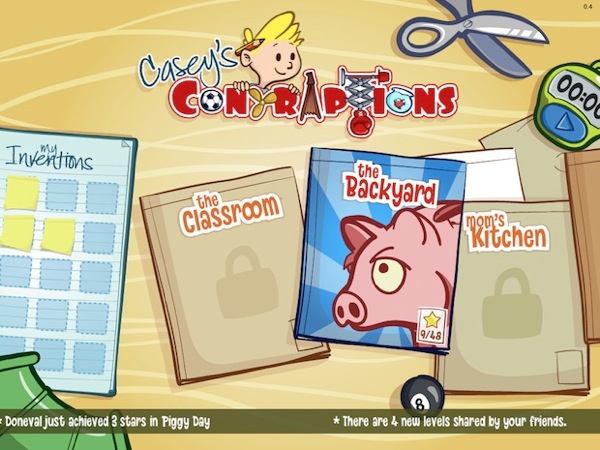
This is a bit of a different project than some of my past ones. This one is a collaboration with Miguel รƒยngel Friginal from Mystery Coconut. I’m doing the programming, Miguel is doing all the art, and we’re both contributing equally to the design and everything else. It has been great having some awesome art to go with the game, but also to collaborate with someone really closely on the game.

Casey’s Contraptions was one of those ideas for a game that I kept wanting to make for quite a while, and now it was finally the right time. It meets the three main requirements that I’m looking for in a game project:

  • Something original
  • Has potential to sell well
  • It involves a creative activity (instead of something violent or destructive)

The idea of games based on mechanical contraptions is not new, but there are surprisingly few games based on it. We are hoping to bring a lot new to the table: Casey himself, unlockable items, interface built from the ground up for multi touch, modern physics simulation, social features, sharing of solutions, and even creation and sharing of new levels. We are really excited to be working on this project and we can’t wait until it’s released.

MainMenu.jpg

Development

Casey’s Contraptions started as a prototype back in the summer. After a day or two messing with physics engines and creating some objects, I knew there was something there, so I spent a two more weeks creating an initial version. It wasn’t much more than a tech proof-of-concept, but it was clear that there was a game there (even with my horrible stand-in clip art assets).

I sent that built to a couple of friends for initial feedback. It was laughably early, but that’s the time when it’s possible to really make radical changes to the design. I knew the people I was sending it to a) were used to seeing games at early stages, and b) were not afraid to tell me if something sucked. Actually, I told them to skip the nice parts and just focus on everything that they didn’t like. Not surprisingly, that initial feedback was crucial, and really shaped how Casey’s Contraptions evolved since then.

Shortly after that, Miguel joined me full time on the game and we dove right into it. For our development, we used a super light-weight agile approach: We have high-level “user stories”, and two week iterations. Iterations are somewhat flexible (plus minus a few days) and we don’t strictly estimate the tasks, just take on as many user stories as we think we can do in that time. The important parts are to always be focused on the most important stories, and to take them to completion each time.

Miguel lives in Seattle and I’m in Carlsbad, so we do all of our work remotely. We use Subversion hosted remotely, and we’re in constant communication through iChat and email. That allows us to iterate on a piece of art, an item behavior, or a menu item multiple times very quickly. It’s not as good as sitting side by side, but I haven’t felt like working remotely has gotten in the way at all.

After a busy month and a half, we got to where you see it today, and we submitted the game to the Independent Games Festival (IGF).

Screen1.jpg

Independent Games Festival

Some people have asked me why I wanted to submit it to the IGF. I have to be honest and admit that I had never really considered not submitting it.

I imagine everybody reading this blog knows about the IGF already. It’s the closest thing to the Movie Academy Awards that we have for independent games. There are many reasons why you’d want to submit your game. The amount of press and prestige associated with winning or even being nominated as a finalist is huge. The prize money is a nice touch, but it’s not really enough to make much of a difference in the game itself (I’m talking about the Mobile Category prize). Of course, there are many other fantastic games that are competing at the IGF (a total of almost 400 games!), so it’s hard to count on becoming a finalist.

One very real and concrete reason to enter the IGF was to have a very well-defined milestone. It wasn’t that different from one of our iterations, except that we had a real customer (the IGF judges) and a non-flexible deadline. That made us really focus our efforts and put in some extra effort in the last couple of weeks to get it in shape for the IGF. Looking back at the game just a couple of weeks ago, it’s amazing how far it came in that time.

igf.gifFor me personally, the biggest reason to enter the IGF is because it’s something I’ve always wanted to do. I’ve followed the IGF since the first one in 1999 (which was, coincidentally, the first GDC I attended). Every time I walked through the booths or watched the award ceremony, I wanted to be part of it. So finally, this was my chance to do it. It was a great experience going through the process. Now the next life goal will be to actually make it as a finalist.
Submitting Casey’s Contraptions had another, unexpected side effect: It tipped our hand and forced us to announce the game sooner than we were planning on doing. It wasn’t until a few days before the submission that we realized the list of IGF games would go public right away. Originally we were planning on announcing the game at 360iDev in mid November, but this forced us to move the schedule up somewhat. Hopefully that will be a good thing and will allow us to build some good buzz in the upcoming months all the way until the release. Keep an eye out for a gameplay video and some hands-on previews in the next few weeks.

If you want to keep up to date with Casey’s Contraptions development, join the Facebook group, follow Miguel and me on Twitter, or keep an eye on the Touch Arcade thread.

This post is part of iDevBlogADay, a group of indie iPhone development blogs featuring two posts per day. You can keep up with iDevBlogADay through the web site, RSS feed, or Twitter.

Games, Resources, And XCode

Up until a few weeks ago, I never had any problems with iPhone game resources. I just added whatever I needed to the XCode project, and it was ready to load from within the game. That simple.

But that was because of the kind of games I was making, which were very light on content, with mostly procedurally generated assets (the consequence of working by myself and being much better at programming than at Photoshop).

That game that Miguel and I are working on right now is a lot heavier on assets. It has locations, and levels, and the whole shebang. And that’s where XCode starts falling short.

Explicit Resources

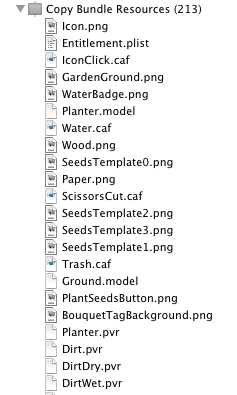
copy_bundle_resources.pngBefore, I was adding all my game assets to the Resources folder in XCode. That adds the file to the “Copy Bundle Resources” step. And as you expect, when you do a build, it checks the date of the existing file, and only copies it if the source file is newer than the destination file.
Personally, I really like this approach. I like to be explicit about what gets included in a game, and I don’t mind at all having to add files manually to the project.

Unfortunately, it has one major flaw: It collapses all assets at the root of the application directory, ignoring the directory structure where they came from. I have no idea what the rational is for this “feature”, but someone needs to be taken out to the public town plaza and whipped for that. Actually, make that a double-whipping session if the reason was “convenience”.

The reason this becomes a big deal now is that we have per-level resources. To keep things sane, we decided to use a directory hierarchy, so Levels/Level00 contains all the files necessary for that level. Same thing with Level01, etc. The problem comes that both those levels have similarly named files: Background.jpg Layout.bin, etc.

Any guesses what happens if you add to XCode two files with the same filename in different paths? Yup. One of them overrides the other. Not a single warning either. Let’s make that a triple-serving of whipping, please.

I briefly considered prefixing all the files with the level name (Level00_Background.jpg), but if later I decide to move Level00 to Level05 that’s a lot of files to rename, so I would end up having to write scripts, or create a separate file with the level ordering, or just generally waste my time doing something that should have been taken care of by the tool.

Folder References

Even though I had read they had their share of problems, I decided to look a folder references (at Miguel’s prompting mostly).

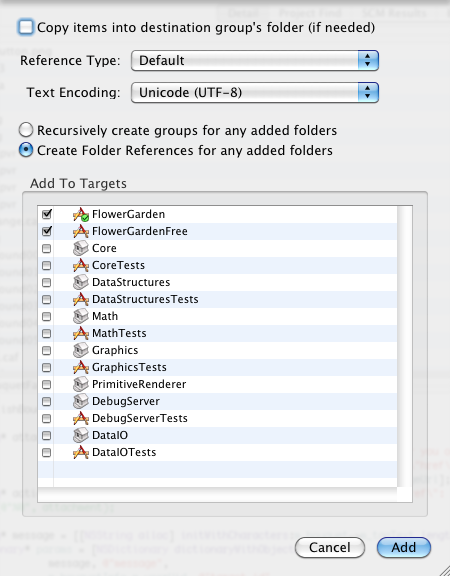
When you add some resources to XCode, you have an option to check “Create Folder References for any added folders”. That option automatically adds any files in those folders without having to explicitly add them to XCode. So you could add the Levels folder, and then any files you create there will be copied with the game.

folder_references.png

I’m not a big fan of assets copied automatically, but as a side effect, that step preserves the directory hierarchy each of those files was in. So any files copied this way can be accessed from within the game by using their full directory structure.

I have to ask again: Why are directory structures preserved here but not with explicit resources added to the project? The mind boggles.

But hey, at least it works, right? Not exactly. There are a couple of gotchas.

The big one I had read in multiple places, is that XCode doesn’t detect any changes to files inside the referenced folder. So you can be making all sorts of changes, building the game, and not seeing anything different. The recommended solution was to add an extra step to the build process that would start by touching the reference folder, forcing a full copy of all assets.

I tested that, I’m glad to report that at least in XCode 3.2.4, that’s not the case. If you modify any file inside a referenced folder, the file will get copied over correctly during the build process without the need of extra steps.

The bad news is that all the files in the referenced folder will be copied. Why oh why??? They clearly know which file changed, why do they feel the need to copy all of the other files? No idea. This is not a big deal early on, but as you start to accumulate dozens and hundreds of megabytes of assets, build times start increasing quite a bit, especially on the device itself.

This is what the copy command looks like for referenced folders:

CpResource build/Debug-iphonesimulator/Test.app/Levels Levels
cd /Users/noel/Development/Test/trunk/Test
setenv PATH "/Developer/Platforms/iPhoneSimulator.platform/Developer/usr/bin:/Developer/usr/bin:/usr/bin:/bin:/usr/sbin:/sbin"
/Developer/Library/PrivateFrameworks/DevToolsCore.framework/Resources/pbxcp -exclude .DS_Store -exclude CVS -exclude .svn -Testve-src-symlinks /Users/noel/Development/Test/trunk/Test/Levels /Users/noel/Development/Test/trunk/Test/build/Debug-iphonesimulator/Test.app

It’s nice touch that it automatically excludes .svn directories though. I was wondering why they use CpResource instead of plain, old cp, but I guess that’s to be able to -exclude specific files. Fair enough.

However, what CpResource apparently doesn’t do is to process any of the resources in ways that were processed before by XCode. For example, a png file would have been processed by premultiplying it and byte swapping it so loading it in the iPhone would be slightly more efficient. CpResource just does a regular copy and leaves it alone. So if you were relying on that behavior, you need to do it explicitly yourself in your asset baking step.

What I Really Want

For now, I’m using folder references for the levels, and explicit references for everything else. That way I keep the data size to a minimum but I get to have the directory hierarchy. Not ideal, but at least it works.

This is what I would really like thought:

  1. Easiest: Explicit assets with paths. I really want to just add resources to XCode and have it preserve the directory structure. It’s not that hard. If XCode were open source, I would have made that change a long time ago. Can we at least have this as an option?
  2. Second easiest: Folder references that only copy the changed resources. That would also be OK in my book, and I can’t believe it would be much harder to implement either.
  3. Best: A remote file system hosted on the Mac during debug build. All file references go out to the host machine and get loaded on the fly. This would allow for fastest build times and loading times would not be that different from a fragmented drive on an old device probably. I know some of you already have something like this. Has anybody made one open source (preferably minimalistic and standalone)? I’d love to check it out.

Of course, all of this has probably changed already with XCode 4, but I’m deathly afraid of installing it while working on a production game. Has anybody tried it yet? Have they fixed anything, or is it even more broken?

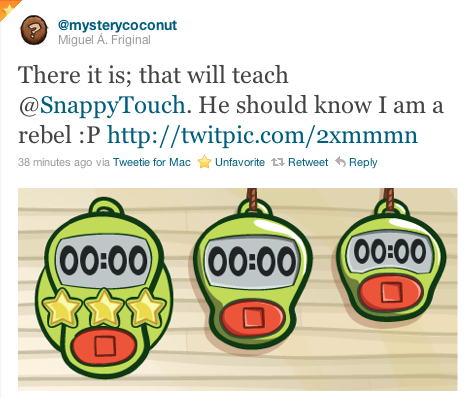
To wrap things up, and since Miguel is spilling the beans on Twitter, I’ll share a few assets from our current game. Now back to the game because we’re submitting it to the Independent Games Festival on Monday. Next Thursday I’ll talk about the IGF. Wish us luck!

clock.png

This post is part of iDevBlogADay, a group of indie iPhone development blogs featuring two posts per day. You can keep up with iDevBlogADay through the web site, RSS feed, or Twitter.