
I remember back in the mid-90s, I went through 5 or 6 19″ CRT monitors before I found one that I thought was acceptable running at 1600×1200. I believe it was a Samsung and it even needed BNC cables to get the signal without interference and degradation to get the quality I wanted.
Fortunately, display technology caught up over the years and I’ve been happy with the LCD monitors I have since then.
Until now.
I’ve been looking into large LCD monitors to set up in my new office with my Macbook Pro, and I find myself pushing into the limit of technology once again. The results: I went through 3 monitors of about $1K each. Two fell completely short, and one was perfect.
The Shiny: 27″ Apple Thunderbolt Display
The top contenders starting out were the 27″ Apple Thunderbolt Display, and the 27″ Dell U2711. I read reports that they both use the same display technology, and the differences between the two were relatively minor. After some conflicting reviews (that should have been the first warning), I decided to go with the Apple Display.
This display seemed perfect for me. It looks gorgeous, like an oversized iPad. The image quality is fantastic, with text being sharp and clear and having a great resolution. Since I’m only connecting a Macbook Pro to it, the connections are perfect: The Thunderbolt cable is great because it deals with display, USB, ethernet, and even audio in one fell swoop. The display also has a power cable for the Macbook Pro, so it’s like a perfect docking station.
It really was almost perfect. Almost.
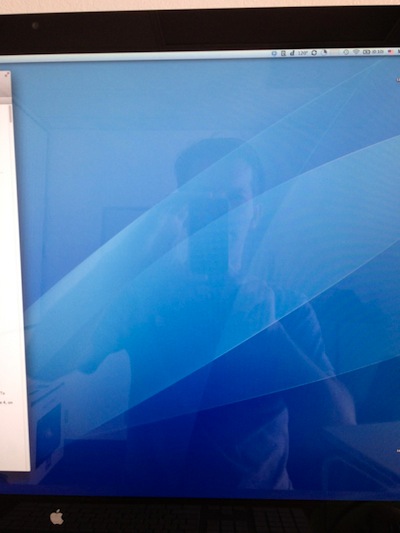
The glare was simply horrible and I could see myself reflected on the screen, even with a white background. The shiny display was almost a perfect mirror. It might be the ideal display if you like to work in a dungeon, but I like light, the more the better. Even though my office has no direct sunlight, just the indirect light coming in was enough to see everything brightly reflected on it.

What’s worse, if one day I had to rearrange things or move to a different office and I had a window behind me, it would go from distracting to impossible to see anything.
Another annoying aspect of that monitor is that the stand height wasn’t adjustable. I like to look at a monitor straight while my arms are about a 90-100 degree angle, so the monitor ended up being several inches too low. I can do the old phone book trick, but it seemed ridiculous having to do that on such a beautiful display.
As much as I liked that display, it just wasn’t for me.
The Ugly: Dell U2711
In spite of some comments complaining about “over aggressive” anti-glare coating, I decided to give the Dell U2711 a try. I had used Dell monitors before and I was never bothered by the screen. And after all, the antiglare coating could fix the problem the Apple display had. Apart from the antiglare, it had some attractive options: Multi-card reader, several video inputs, and better color options. It could be the perfect screen.
It turns out it was far from that. It was the opposite of the Apple display in many ways. Connecting it to the Macbook Pro was a hassle since it shipped with a Displayport cable, but not a Mini Displayport one. I tried using my Mini Displayport to DVI adaptor, but it turns out it was single-link and you need a dual link to drive the full 2560 x 1440 resolution.
Once I finally got it up and running (with a Mini Displayport to Displayport cable), the resulting image was plain ugly. The colors were off, but more seriously, the antiglare coating really was horrible. It made the screen look like there was a fine coating of dust on it, or like it was film with a very obvious grain to it. I had to strain my eyes to focus on the text because the graininess kept throwing me off.
I suppose I could have gotten used to it, but since I use the Macbook Pro display next to it, going back and forth was torture. One moment I would see this clean, sharp, beautiful display, the next moment I would see this horrible grainy mess.
To make sure I wasn’t hallucinating, I took a picture of both displays with my iPhone displaying the same content. The differences are obvious (click on them to see them full size).

Macbook Pro with antiglare

Dell U2711
In case that wasn’t enough, the colors were severely off. I played around for an hour with the custom settings and some advice from the internet, but I just managed to make them a bit better. I still liked the colors on the Apple Display (or the Macbook Pro) way better.
The Good: 30″ Apple Cinema Display
At this point I thought I was out of luck, and that I was going to have to settle for either one of those two monitors (I would take the 27″ Apple one), or something smaller but without those problems.
Fortunately, several people on Twitter encouraged me to try out the 30″ Apple Cinema Display. I never saw paid attention to one, but apparently they had fantastic image quality and a good antiglare coating. That sounded promising!
One of the pleasures of being a small company is that once I decide to do something, I can do it right away. There’s no paperwork, approval, ordering through certain channels, or any of that overhead. Since Apple doesn’t make that display anymore, I hopped on Craigslist, called a guy up, and picked it up a few hours later. Done!
And boy was I glad I did! That monitor is everything that was cracked up to be and more! Since it’s an older display, it doesn’t have Mini Displayport cables, so I had to use a Mini Displayport to Dual DVI adaptor. The image quality is indeed, outstanding, and the colors are quite good (although maybe a touch redder than the laptop).
I actually love that it’s a 16:10 ratio instead of the more common 16:9 in most monitors today. That gives results in a resolution of 2560 x 1600, which gives me some much-needed vertical space when writing code (which is 80-90% of my day).
As a totally minor, but nice side effect, the brightness controls on the keyboard control the screen brightness (which is kind of surprising considering it’s connected over the dual DVI adaptor, but there’s also a USB cable going into the display, so maybe it’s communicating through that channel).
The only drawback is that the back only has two USB ports (I wish it had 4 or more). It does have two Firewire ports as well, although I don’t have any devices that use those.
For completeness sake, I took a picture of the new monitor with the same image I used as a test earlier. It shows how much cleaner the image is than the Dell.

Conclusion
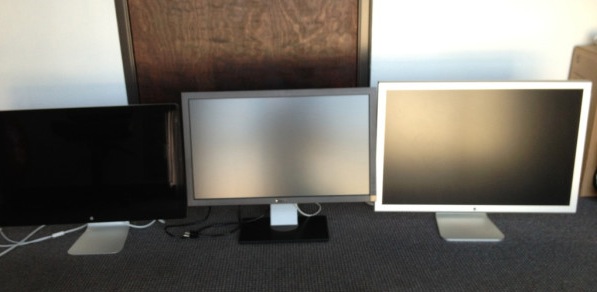
From left to right: The shiny, the ugly, and the good.
If you’re picky like me about the quality of your displays, and you’re looking for a large monitor, I can’t recommend the 30″ Apple Cinema Display enough. It’s a shame that Apple stopped manufacturing it, so check Cragislist or Ebay for it. If you work in a dark place, maybe the 27″ Thunderbolt one will work as well. Whatever you do, stay far, far away from the Dell one.
We can only hope that Apple will make a revision of the 27″ Thunderbolt Display soon with a high-quality antiglare coating like the laptops. In the meanwhile, I’m thankful both Apple and Dell have good return policies.
Thanks for sharing your experience Noel.
I can’t fathom why Apple discontinued 30″ mate Cinema Displays in the first place, only to replace them whit what is IMHO average quality glass 27″ Thunderbolt display. It’s a typical Apple move where a great feature or product is supplanted by drastically different and usually inferior one without the actual need or reason that might warrant change in the first place. This is my greatest gripe with Apple, they like to change things for the sake of change and without actual need or justification.
For the arts sake?
Noel, I found this fascinating because it parallels a lot of what I went through this year. I started to explain in a comment but it got so long I just turned it into a blog post :) You can read it here: http://www.myappventure.com/
I just stopped by for the first time in several
months. Doing what you love is awesome and I envy your passion. I’ve developed a couple of games for the
iPhone, but it was more of a test to see if I could do it than anything
else. I love writing games, but just can’t
make enough money at it to make a living.Â
I know it sounds stupid, but I make six figures writing business
software that I really don’t like writing.Â
However, now I’m stuck unless I want to start completely over. If I would have followed my passion years
ago, I’d probably be making a good living doing what I wanted to do instead of
making a good living doing what I don’t want to do. Sorry for the rant, but just wanted to come
cry for a while. Good luck on the next
game, and I will be watching.
That was really interesting to know. Good writing.
Thanks for the comparison.
I use a 27″ (2011) iMac display and can confirm the glare.
I keep my back to a white-painted-brick wall which keeps the glare down, but even still, if there is black on the monitor it becomes a mirror. I absolutely love the iMac and screen, but I could never recommend it to anyone doing serious graphical work. Even for writing code you need to be in an environment where you control the lighting for it to be functional.
I guess shiny outsells matte. Hopefully they bring the matte ones back soon!
how about sand-blasting an Apple 27 display? 🙂
If you don’t want it anymore, I’m searching one. I can buy it for like 450$.
Excellent Game!. Try-“Mario Duck Hunt | Mario Games†updated, Both for
iphone and ipad also! Amazing. You can get new 3 things-Extra bonus level, New Jingles for the game and the most important Finally users will be able to
kill the annoying DOG. Get it @ http://itunes.apple.com/us/app/mario-duck-hunt-mario-games/id389205355?mt=8
Excellent Game!. Try-“Mario Duck Hunt | Mario
Games†updated, Both for iphone and ipad also! Amazing. You can get new 3
things-Extra bonus level, New Jingles for the game and the most important Finally users will be able to
kill the annoying DOG. Get it @ http://itunes.apple.com/us/app/mario-duck-hunt-mario-games/id389205355?mt=8
Interesting.Â
The U2711 comes with a printed calibration report, for your own monitor, in the box. Did you check the report to see if the monitor was perhaps correct and your reference colors were off? If you want to talk objectively about colors being off, I think it would be more fair to consider the possibility that your laptop display is not correctly calibrated. Eyes adjust quickly.
I’m not trying to troll. Color is so subjective; it comes down to what makes you happy. I’ve read claims by people who think they are tetrachromats, and if a display is slightly too warm it’s a huge deal for them.
Disclaimer: I use a U2711 every day. I’ve had other issues with it; I do think the coating is slightly too thick and grainy, and the CCFL backlight starts slightly yellow and takes some time to come up to temperature. That said, the color fidelity is (in my entirely unsupported opinion) better than the 27″ iMac panel that sits next to it. I prefer the Mac for typography and the Dell for palette selection.
The 2711 is a wide gamut monitor, and the OS needs to use a colour profile to match the RGB8 colour space to the 10bit used by the 2711. And of course, needs to be calibrated.Â
  The thunderbolt is only capable of displaying 70% of the NTSC spectrum, no wonder the 2711 feels a bit off. With the monitor set to any wide-gamut mode (including Custom and Adobe RGB), the monitor will definitely display sRGB images (which most are) in more garish colour when viewed in non-managed applications than in CS5 or LR. Why? Because a wide-gamut monitor displays any particular RGB values with more saturated colour, compared to how a normal-gamut monitor would display the same RGB values. That’s what wide-gamut monitors do! So any non-managed application (such as the Windows desktop and non-managed browsers such as IE – even IE9) will display any image with more saturated colour on a wide-gamut monitor than on a normal-gamut monitor.Â
Spent near £800 on the mac screen, cant even look at it due to reflections. Really causing me eye issues with pulsing muscles. Ive decided to get the kids to rub some greasy hands all over it to dull it down, either that or some matt spray paint!
Apple, why make gloss screens… its yuck, yuck, yuck for designers!
Thank YOU!! Great stuff! I am returning my display right now and searching for the 30 inch cinema!