One of the most requested features for Flower Garden is to be able to move pots around. Not only do players want to group similar flowers or colors together, but they also want to be able to take advantage of the properties of the different gardens. I figured the best thing to do this is by mimicking the wobble on the iPhone launchboard icons when you enter edit mode.
I have to say, I’m not a huge fan of the wobble movement, but it does indicate that icons are “loose” and movable. And since most players are already familiar with that metaphor, and the overhead view of Flower Garden resembles the launchboard quite a bit (not coincidence), I might as well go with it.
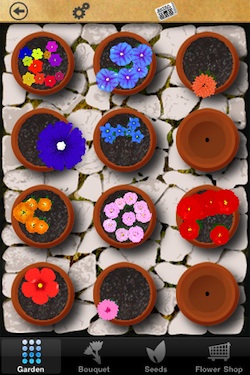
Each pot is a UIButton with a custom image (rendered from OpenGL into an off-screen target). So when I enter edit mode, I need to wobble them like the launchboard. Easier said than done.
I searched online and asked on Twitter, but surprisingly, nobody had done a perfect, reverse-engineering of the wobble movement. Most mentions just do a z rotation on a sine wave, which is not that close of the launchboard animation.
I found that to get closer to the real thing, you need to do that rotation around a random point offset from the center. That’s better, but it’s still not perfect. There’s an additional extra twitch in the original Apple animation. I’d love it if someone already reverse-engineered it and has a better model for that animation.
In the meanwhile, I figured I would share the core I’m using. It’s all very straightforward, except for the part about rotating a UIView around a different point other than the center. I initially thought I could just concatenate transforms, but no matter how you do it, UIKit always interprets the transform around the center.
To be more precise, it interprets the rotation around the anchor point, and that’s what you need to modify. The anchor point is defined in units that are a percentage of the layer’s size, so by default it’s 0.5, 0.5. When you move the anchor point, the layer itself will move, so you need to fix it up by moving the layer’s position by the same amount in the opposite direction.
This is what the final code looks like:
void StartPotWobble(UIButton* button, Random& random)
{
	const Range posOffset(0.10f, 0.2f);
	const float amplitude = random.GetFloat(1,1.5f);
	const Vec2 startCenter(Sign(random.GetFloat(-1,1))*random.GetFloat(posOffset), Sign(random.GetFloat(-1,1))*random.GetFloat(posOffset));
	const Vec2 endCenter(Sign(random.GetFloat(-1,1))*random.GetFloat(posOffset), Sign(random.GetFloat(-1,1))*random.GetFloat(posOffset));

	CGPoint center = button.center;
	button.layer.anchorPoint = CGPointMake(0.5f + startCenter.x, 0.5f + startCenter.y);
	CGRect bounds = button.bounds;
	button.layer.position = CGPointMake(button.layer.position.x + bounds.size.width*startCenter.x,
									button.layer.position.y + bounds.size.height*startCenter.y);
	button.transform = CGAffineTransformMakeRotation(-amplitude*DegToRad);

	[UIView beginAnimations:nil context:NULL];
	[UIView setAnimationRepeatAutoreverses:YES];
	[UIView setAnimationRepeatCount:FLT_MAX];
	[UIView setAnimationDuration:0.12];
	[UIView setAnimationDelay:random.GetFloat(0,0.09f)];
		button.transform = CGAffineTransformMakeRotation(+amplitude*DegToRad);
	[UIView commitAnimations];
}


void StopPotWobble(UIButton* button)
{
	[button cancelAllAnimationsRecursively];
	button.transform = CGAffineTransformIdentity;
	CGPoint anchor = button.layer.anchorPoint;
	CGPoint offset = CGPointMake((0.5f - anchor.x)*button.width, (0.5f - anchor.y)*button.height);
	button.layer.anchorPoint = CGPointMake(0.5f, 0.5f);
	button.layer.position = CGPointMake(button.layer.position.x + offset.x, button.layer.position.y + offset.y);
}
Ah yes, and I couldn’t find a way to loop the animation infinitely (without using the new UIView animation syntax), so FLT_MAX will have to do :-) Any cleaner way?
If someone has an animation that more closely resembles the iPhone launchboard, I’d love to hear about it. Let me know and I’ll update this post.